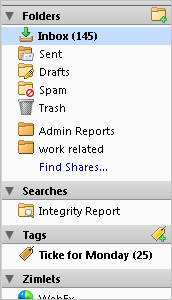
On the left-hand side of the Advanced Email Web Client interface are your folders, searches, and tags.
Inbox is where new mail is placed by default
Sent contains messages that you have sent
Draft contains composed messages that have not yet been sent
Junk contains messages that have been marked as spam either by you or by the system
Trash contains item that you have deleted
Folders that you have created follow. If your mail account was migrated from another mail system such as Microsoft® Outlook, you may see extra folders here that represent folders on the previous mail system
Unread Message Count. The number in parentheses next to each folder is the number of unread messages contained in that folder. Tags folders display unread message count as well. Any item with unread messages is bold.
To see the number of messages and the total size of the folder, hover the cursor over a folder.
. 
Find Shares is a link to quickly find and add folders that have been shared with you. When the Add Share Folder dialog opens, items that have been shared with you through distribution lists are listed. In the Find Shares field, you can enter an email address to see if an item was shared with you from a specific address.
This area contains search queries that you created and saved for future use.
This area shows the tags you have created. Click on a tag to quickly see all messages that are tagged with that tag. See Using tags to classify mail messages for more information.